15. Change Feature Type
Tool that allows changing the type of element of an object of the network by another of a different type.
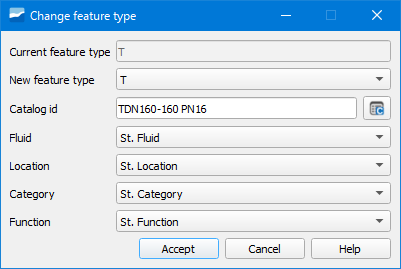
Fig. 15.1 Window of the Change Feature Type tool.
The change can be made between arcs, nodes, connections and gullies. Once the element to change is selected, in the pop-up window we must specify:
Current feature type: current element type. It is selected by default.
New feature type: type of element to which we want to change. We will select one in the dropdown. We will have all those that in the “Node feature catalog” have the value true in the active field.
Catalog id: catalog of the new element. Clicking on the adjacent button will open a window where we will specify:
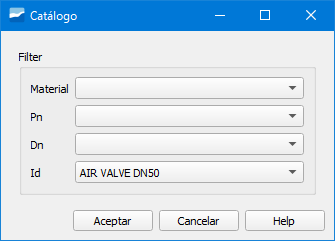
Fig. 15.2 Window to change the catalog to the new element.
Material: material of the element.
Pn: nominal pressure of the element.
Dn: nominal diameter of the element.
Id: identifier of the element.
Additionally, if we have information about the fluid type, location, category and function we can select it in Fluid, Location, Category and Function.