1. Selector
Tool that allows filtering the information that we want to use in different scopes of the project.
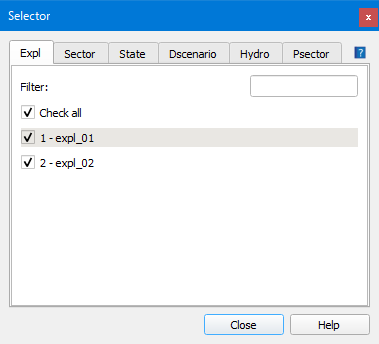
Fig. 1.1 Window of the Expl tab in the Selector for a ws project.
It is divided into the following tabs:
Expl: shows a list of all theexplotations that we have in the project. By clicking on one of them, its display will be activated or deactivated. By activating any of them, all the others will be deactivated. To view several, the Shift key of the keyboard has to be pressed at the same time as clicking on theexplotations to be viewed.
Sector: shows a list of all the hydraulic sectors of the project. Its operation is identical to that of theexplotations. The ones that are selected will be the ones that will be exported in the INP file and, therefore, the ones that will be simulated hydraulically.
State: state of the objects to be displayed on the map. We can visualize the operative and/or obsolete objects.
Dscenario: list of the demand scenarios contained in the project. Those that are selected will be exported in the INP file and, therefore, will be the ones that will be simulated.
Hydro (WS): shows a list of the states of the subscribers that we want to consult. Only it will be reflected in the Hydrometer tab of the connec.
Psector: list of the planning sectors contained in the project. Those that are selected will be directly visible on the map and will be the ones that will be exported in the INP file.