14. Delete Feature
Avís
Take extreme caution when deleting objects; deleting them can cause serious errors in the network because it can break the topology.
Tool that allows deleting a feature of the network definitively.
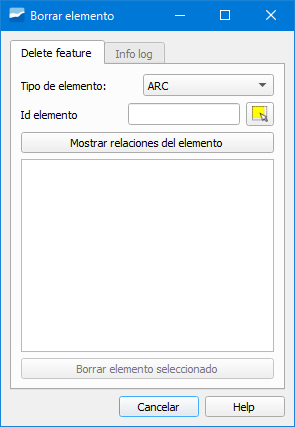
Fig. 14.1 Window of the Delete Feature tool.
We can delete arcs, nodes, connecs or gullys. In the pop-up window we will have to specify:
Element type: we will select the type of object to delete from the dropdown (arc, node, connec or gully).
Element id: identifier of the element to delete. If we do not know it, we can use the Select object button on the right to select it.
Show element relations button: click on it to see the relationships of the object with the rest of the network. To be able to delete an element we must click on it obligatorily and only objects can be deleted one at a time.
Delete selected element button: click on it to delete the object definitively and it will only be available after clicking on the Show element relations button.
After deleting the element we will see in the Info log tab a summary of the operations performed.
Important
The objects can only be deleted one at a time and if after deleting one we want to delete another, we will have to click on the Delete another element button which will be available in the Info log tab.